
Beach Sand Art Name Drawing
What players say
Beach Sand Art Name Drawing succeeds as a digital relaxation tool rather than a traditional game. Its strengths are the realistic sand texture, adjustable line thickness, and a sticker set that encourages simple composition. The lack of scoring or levels will appeal to anyone seeking a calm creative outlet, especially those who enjoy writing names or making shareable art. The main limitation is depth: without progression or challenges, players looking for goals may lose interest quickly.
About
A Calm Canvas on the Shore
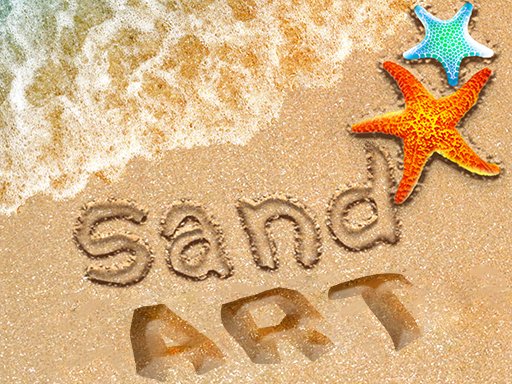
Beach Sand Art Name Drawing turns your screen into a patch of beach sand. The goal is simple: write a name, sketch a shape, or compose a small scene using your finger on touch devices or a mouse on desktop. The drawing tool responds with flowing lines that mimic the resistance and texture of real sand, so strokes feel deliberate rather than slippery. You begin by choosing from several beach sand backgrounds, each setting a different tone for the artwork. [IMG_1] There is no timer, no score, and no fail state—just a blank canvas waiting for your first mark.
Drawing and Decorating
After you finish the main drawing, a sticker collection opens up. You can place shells, starfish, palm trees, and other beach-themed items anywhere on the sand. Each sticker can be moved or resized, letting you build a balanced composition without starting over. The name writing tool includes adjustable line thickness, which matters more than it sounds: thin lines work for delicate script, while thicker strokes hold up better against textured backgrounds. Undo and redo buttons sit within easy reach, so experimenting with placement or line weight never costs you progress. [IMG_2]
Saving and Sharing Your Sand Art
When the picture looks right, you can save it to your device in high quality or share it directly through social media and messaging apps. That sharing step is the closest thing to a goal in the game—many players create sand art specifically to send as greetings or personal notes. Because the interface avoids menus and tutorials, a first-time player can go from opening the app to saving a finished piece in a few minutes. The experience is designed for children and adults alike, with no prior drawing skill required.
✅ Compatibility & Testing
FAQ
Comments
Sign in to comment
You must be logged in before posting a review or rating.
No comments yet. Be the first to comment!


Editorial Notes