
Letter Dash Typing Challenge
What players say
Letter Dash Typing Challenge keeps its scope narrow: type the falling letters before they reach the bottom. That simplicity is the strength. The progressive speed increase creates a natural difficulty curve, and the keyboard-only controls remove barriers for beginners. The family-friendly design makes it suitable for children and adults. The main limitation is depth—there is no story, customization, or structured lesson plan. It works best as a short, repeatable practice tool rather than a long-session game.
About
Falling Letters, Fast Fingers
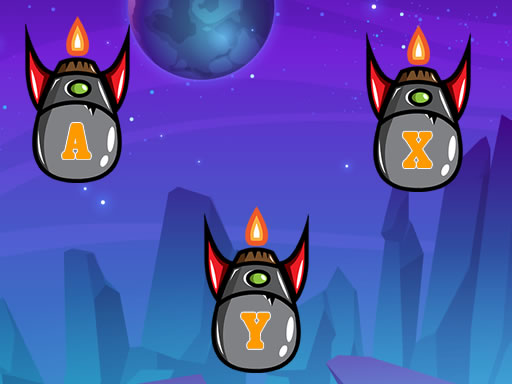
Letter Dash Typing Challenge turns keyboard practice into an arcade reflex test. Letters appear at the top of the screen and drift downward. Your only job is to press the corresponding key before each letter hits the bottom. A correct keystroke removes that letter from play. Miss too many, and the screen fills up until the game ends. There is no mouse, no menu diving, and no complex control scheme—just your keyboard and your reaction time.
How the Difficulty Ramps Up
The game does not stay at one speed. As you clear letters, the falling pace increases, or the game introduces more complex sequences that demand faster recognition. This progression is the core of the challenge: early rounds let beginners find the right keys without pressure, while later rounds punish hesitation. Because the difficulty adjusts based on your performance, the game keeps pushing you to type more accurately and more quickly at the same time.
Who Gets the Most Out of It
Anyone who wants to practice typing without a formal lesson plan will find the format useful. Children learning keyboard layout, adults brushing up on accuracy, and experienced typists chasing higher scores all fit the same basic loop. The content stays family-friendly throughout, with no inappropriate material. Sessions can be as short as a few minutes, which makes it easy to fit practice into a break rather than committing to a long course.
Practical Advice for Better Runs
Accuracy matters more than raw speed when the letters start falling faster. Hitting the wrong key does not clear the letter, so a rushed mistake costs you twice: the letter stays, and you lose the time spent on the wrong press. Keeping your eyes on the screen instead of glancing down at the keyboard builds the visual-to-key mapping that makes later rounds manageable. Short, regular sessions tend to work better than one long grind because concentration drops as the pace climbs.
Compatibility
FAQ
Comments
Sign in to comment
You must be logged in before posting a review or rating.
No comments yet. Be the first to comment!
Editorial Notes