
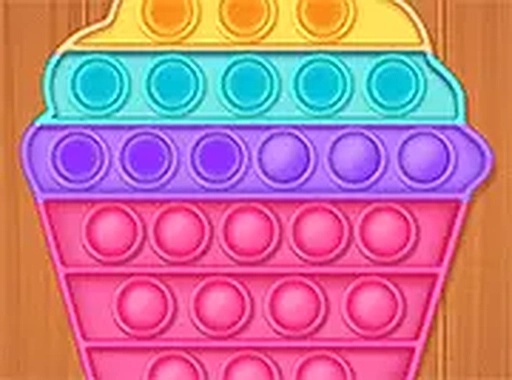
Bubble Pop Calm Puzzle
What players say
Bubble Pop Calm Puzzle succeeds by removing almost everything that typically creates tension in a game: no timers, no scores, no penalties, and no required order. The soft popping sound and bright colors make each press feel tactile and pleasant, while the hidden designs underneath give a small reward for clearing a screen. It suits children, older players, and anyone needing a brief mental reset. The main limitation is that the experience stays the same from screen to screen—there is no difficulty curve or new mechanic to master, which is intentional but may not hold attention for long sessions.
About
Popping Bubbles, Uncovering Art
The core action in Bubble Pop Calm Puzzle is simple: click or tap a bubble, hear a soft pop, and watch it vanish to reveal part of a cheerful design. There is no required order—pop any bubble you like, whenever you like. Your only objective is to clear the current arrangement. That freedom means you can work quickly, slowly, or somewhere in between, depending on your mood.
Designed for Unwinding
Bright, gentle colors keep the screen easy on the eyes, while the popping sound mimics a real fidget toy. That audio cue gives each press a satisfying, tactile feel even though you are using a mouse or touchscreen. As bubbles disappear, hidden patterns emerge, adding a small layer of visual discovery that rewards continued play without demanding it.
A New Screen, Never a New Challenge
Once you clear a screen, a fresh arrangement appears. These layouts change regularly, so there is always something new to see, but the game never introduces time limits, penalties, or scoring. Progression is purely about how many screens you feel like completing. You can stop after one screen or play through several—the experience stays the same calm, pressure-free loop.
Play Anywhere, Instantly
Bubble Pop Calm Puzzle runs in any modern web browser. No downloads, installations, or accounts are needed. It works on desktop computers, laptops, tablets, and smartphones. Touchscreen users tap bubbles directly; mouse users click. A full-screen mode is available if you want a more focused view. That wide compatibility makes it easy to fit a short session into a busy day.
Compatibility
FAQ
Comments
Sign in to comment
You must be logged in before posting a review or rating.
No comments yet. Be the first to comment!



Editorial Notes